Saturday, 27 July 2019

HOW TO RECOVER/BREAK PASSWORD IN ROUTER

 BREAK / RECOVER PASSWORD IN ROUTER:-


There are some step to break / recover password in router.
step1.  Connect console cable with computer.
step2. open putty //command.
step3/ .Restart Router and press ctrl+c or ctrl+shift+break at time while rebooting of router.
step4. now you will be in rommon mode ,it is an factory default.is  like this in fig.    

step5. write  confreg 0x2142, then press enter. as like in above fig.
step6. rommon2> write reset press enter. and waite a minute.
step7. Now come in privilege mode ,and write
step8. show startup config
step9.copy startup config   as like in below fig.


step10. running config  , after this write code as in fig.
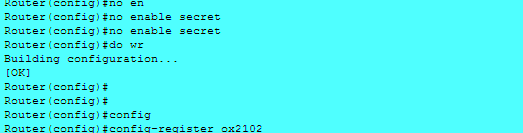
step11.no enable secret ,thi as like in fig


step12. Configure resister ox2102
step13. end
step14. write
step15. reload.

Click here to go to ios backup of router:

Friday, 26 July 2019

PASSWORD IN ROUTER


Password for Router:-

there are we tell aboute three types of password for security purpose.

Consol password;-

this password is used in router to secure the consol port of router or also authentication verifying for entry in user mode.in given below  picture show you a commond for consol password and it is define in configure mode.


note -where xyz->any password you can write

Auxiliary port password;-


This password is used to secure auxillary port of router from any user. this password is also command in configure mode of programe.

note -where xyz->any  password you can write.

  • Privileged  mode password:-
  • Privileged  mode password is used to stop unknown user to enter  in the  privileged mode. here we used a two types of password .
    Clear text password:-

    in this password system any body show your password on display. throw cmd


    note -where xyz->any  password you can write.

    Encrypted password :-


    This password is secret password ,it is a strong password it is restored in encrypted form.
    Note :- encrypted password and clear text password neve can be same.


    How to recover/break password, click here

    TELNET AND SSH

     TELNET AND SSH(Secure Shell):


     Telnet:


    (1).  It is used to remotely control /access the Router.
    (2). the port no. is define as 23.
    (3). Telnet is based on tcp & it can be used to have an interface tcp connection of protocols.
    (4). To login the server ,telnet assign username and password.
    (5). it is unseccured.


    TELNET AND SSH  SETUP

    Telnet configuaration:-

     for telnet confiquaration we should follow bellow cmd in system cli.


    step(1).
    line vty 0 4(here we can write any number for confiquaration from no. of computer. example  : we want to access tellnet from 3 computer then we write there 0 2. ).
    NOTE: Any system can access only 16 computer for telnet at one time.

     step(2).
    login local
    step3.
    username  abc  password cisco@200 (you can use any username/ passwoed in place of abc / cisco@200).
    step4. 
    exit.
    step5.
    enable secret xyz(xyz is a password can change it).
    step 6. do write.
    in this fig is telnet confi. in router.


    In fig here laptop 7 is used for remotely configuration.
    CONFIGURATION IN REMOTLY COMPUTER 7

    in fig show you configuration in laptop 7.


    SSH(Secure SHell):-
    1. SSH stand for secure shell .
    2. SSh was developed by SSH community security ltd.
    3. Secure shell is a protocol used for a secure connection between two system . in this protocols ,the client machine initiates a connection with a server machine.
    4. The clienttransmit it authentication info to the server such as  ausername and password in an encrypted form.
    5. The entire data send recieve during the connectio  is  transfered using strong 512 bits encryption ,making it extremly different and strong realistic.

    SSH CMD:-

    Note :- SSh support RSA encrypted mode.
    step 1. line vty 0 5.
    step2. login local
    step3. exit
    step4. username xyz  password abc (here xyz and abc are username and password respectively. you cant change it.)
    step5. enable secret xxx
    step 6. hostname r2 (hostname is must required for ssh confiquaration).
    step7. ip domaim name example.com(can ive any domain name)
    step 8. crypto key generate rsa


    Now go to pc 7 in commond
    step1. ssh-l (it is L not one) admin 192.168.1.1  (here admin means username xyz)
    step2. password

    OSPF(Open Shortest Path First) Dynamic Routing

       OSPF DYNAMIC ROUTING :

    1. ospf stand for open shortest path first. and it is  layer 3 protocal.
    2. Open Shortest Path First (OSPF) is an open standards routing protocol that’s been implemented by a wide variety of network vendors, including Cisco.

    3. OSPF converges quickly, although perhaps not as quickly as EIGRP, and it supports multiple, equal-cost routes to the same destination. 
     4.Administrative distance (AD) value is 110 and protocol no . is 89.

    5. It use dijkstra algorithum to find best path.

    6. Ospf supposed to be designed in a hierachical fashion, which basically means that you can separate the larger iinternetworks into
     smaller      internetwork called areas.

    7. OSPF support only ip networks.

    8. OSPF send routing table with unicaste /multicast with the 224.0.0.5 and 224.0.0.6  .

    9. OSPF used process id (1- 65535) always effect locally not globally.

    10. it is classless routing and support VLSM.And used wild-card mask (inverse of subnett mask).


    OSPF CONFIGURATION: 


    STEP 1.  router ospf 2( it is a proccess id)
    step2. network 1.0.0.0( network ip address)  0.255.255.255(wildcard-mask  ) area 10.
    step 3 . do wr.
    see in ass fig. 

                          
    ospf confiquration
         here in the fig we used
    10.0.0.0 in place of 2.0.0.0  .for loopback 0.
    .

      OSPF TERMINOLOGY:


    LINK: - A link is a network or router interface assigned to any given network.

    ROUTER ID: - The router id is an IP address used to identify the router. CISCO chooses the router id by using the highest IP address of all configured loopback interface.

    NEIGHBOR: - neighbors are two or more routers that have an interface on a common network, such as two routers connected on a point to point serial link.

     ADJANCECY: -
    An adjacency is a relationship between two OSPF routers that permit the direct exchange of route updates.

     Neighbor ship database:
    -
    The neighbor ship database is a list of all OSPF routers for which hello packet has been send.
     
    Link state advertisement: - A link state advertisement (LSA) is an OSPF packet containing link state and routing information that’s shared among OSPF router.
     
                                                                                          OSPF AUTHENTICATION:
     
      There are three types of authentication support by ospf routing.
      1. Null Authentication.
      2. clear text Authentication .
     
                
    clear text authentication
     
      3. MD5 Authentication.
     
                         
    md5 authentication
     
     
    NOTE :- this above fig code used for ospf authentication on interface.

    EIGRP(Enhanced Interior Gateway Routing Protocol)

     EIGRP DYNAMIC ROUTING:-   

                                                               
    EIGRP stand for Enhanced Interior Gateway Routing Protocol.
     1. Cisco proprietary protocol .
    2.   EIGRP is a classless, enhanced distance vector protocol that gives us a real edge over another Cisco proprietary protocol.
     
    3.   EIGRP is sometimes referred to as a hybrid routing protocol because it has characteristics of both distance-vector and link-state protocols.
    4.   EIGRP use 224.0.0.10 multicasts address to communicate with each other.
     
    5.  Maximum hop count 255
     
    6.  Maximum hop limit by default 100 ..
     
    7 .Administrative distance value is 90 . class="auto-style8">Eigrp port no. is 88.

    8. Load balance – 4 by default.
     
    9. Maximum path = 16 .
     
    10. Neighbor ship is created by hello message.
     
     11. Hello time interval in LAN-5/sec, hold-down=15/sec, in WAN=60/sec, holddown= 180/sec.
     

    EIGRP NEIGHBOR  CONDITIONS:

    1.  EIGRP routers are willing to exchange routes with each other, they must become neighbors.  There are 4 conditions that must be met for neighbor ship establishment .
    2. Hello or ACK received. .
    3. AS(Autonomus number 1-65535) number should match .
    4. Identical metrics ( K value must match) .
    5. Authentication must match.
    EIGRP CONFIGURATION :-
    STEP 1 > go to in configuration mode.
    and follow as in fig.

             
                   yo can code indivisually.
    NOTE: For checking  neighbor write:  show ip eigrp 1 neighbor.


    EIGRP AUTHENTICATION:
     Now i will learn about how to secure my eigrp routing throw eigrp authentication.
    lets start: EIGRP support only md5 / encrypted authentication.
    step/cmd 1.key chain vinit
    step/cmd 2. key 2.
    step/cmd 3.  key string cisco@123.
    after these command goto in interface of router. and give cmd.
    cmd 1.  ip authentication mode eigrp 100(atonomus number) md5.
    cmd 2. ipauthentication ke chain eigrp 100 vinit(key name).
    example of code in eigrp routing with fig.
                            
    eigrp maintain three tables:-
    1.Neighbor Table:It contains list of directly connected to router.
    2. Topology Table: It contains list of best path and alternate best path.
    3. Routing Table:- it contains only best path of routing.


    SOME IMPORTANT TERMS OF EIGRP:-

    1. FD(Fessible Distance)"- total distamce between source to destination.
    2. Successor :- Best path between source to destination  (lowest fd in successor).
    3. Feassible Succesor:- second best path between source to destination.
    Thursday, 25 July 2019

    RIP(Routing Information Protocol)

      RIP confiquaration. via fig:

    rip topology


     RIP version 1 config.

    note : all coding is in config. mode-

     
    step1.  Router(config t)#Router rip                    (enable rip routing protocol on router) Router(config-router).

    step2.  #Version  1                                         (configure router to support rip version 1 or default as version1) .

    Note: without this version command router default supports version 1 Router(config-router).

    step3. #Network 10.0.0.0                           Note: (advertise directly connected netwroknid not ip, if you are implementing subnetting ip range on lab topology use NID or network ) .
    syep4. do wr.


    RIPversion 2 config.

    step1.  Router(config t)#Router rip                    (enable rip routing protocol on router) Router(config-router).

    step2.  #Version 2                                           (configure router to support rip version 2) .

    Note: without this version command router default supports version 1 Router(config-router).

    step3. #Network 10.0.0.0                           Note: (advertise directly connected netwroknid not ip, if you are implementing subnetting ip range on lab topology use NID or network ) .
    syep4. do wr.


        IN fig defines more than one network.


    EIGRP DYNAMIC ROUTING click here ::


    RIP(Routing Information Protocols) Authentication:-


     Rip Authentication  support clear text and md5 authentication .
    see and follow in fig now.
    1.
    clear text authentication:


    2. MD5 authentication/encrypting form authentication in RIP:
    In       md5 authentication same as clear text ,but only change in interface coding ,so see and follow the fig.


    NOTE:- After any programming/coding save with "do wr " code.


    Wednesday, 24 July 2019

    DYNAMIC ROUTING


    WHAT IS DYNAMIC ROUTING AND ITS TYPES:

     1.  Dynamic routing is the process of routing protocols running on the router communicating with neighbour routers.
    2. This automatically created route by the router in a network with the help of protocols.

    3. Once the path is determined, a router can route a routed protocol.

    There are two protocols who is responsible for dynamic routing:-

    1. Routing protocol:-
    it is used by router to send the update message or communicate with other router in a network.
    2.Routed protocol:- it carry network traffic for routing protocols. Examples of routed protocols are ip, ipx, apple talk etc.

    Types of routing protocols:-

    1. IGP ( intergral gateway protocol):- it is a protocol that works within a logical boundry in term of CCNA/CISCO.this logical boundry is called autonomous system.Example:- RIP, IGRP, EIGRP, OSPF, IS- IS ,

      RIP:-  Routing information protocol .
      IGRP :- Internal gateway routing protocol .
      EIGRP:- Enhance interial gateway routing protocol .
      OSPF:- Open shortest path first.
      IS-IS :- Intermediate system- intermediate system .
    2. EGP ( Exterial gateway protocol):- protocol that work between two autonomous system is called EGP. Like:- BGP (Border gateway protocol) .

      RIP(Routing Information Protocol):-

         1.It is a Open System Protocols ,mean can run at any router easily.

     2. it is classfull routing protocols(mean not carry subnet mask).
     
    3. RIP only uses hop count to determine the best way to a remote network, but it has a maximum allowable hop count of 15, meaning that 16 is deemed unreachable.
     
    4. Administrative distance value of rip is 120 .
     
    5.RIP support UDP port n. 520
    6. Routing Information Protocol (RIP) is a true distance-vector routing protocol.
     
    7. load ballancing up to 4 equal part .
     
    8. exchange entire routing table for every 30 second.
     
    9. It works on application layer .and have two types Ripv1 and Ripv2.
     
    DIFFERENTIATE BETWEEN RIP-V1 AND RIP-V2.
     
      
    RIP-V1    
                                           
    1. It is classfull.
     2.Broadcaste 225.255.255.255
    3. No authentication support.
    4. Not support summerisation.
    5. it support v1 and v2 both.
    RIPV2

        1.It is classless.
        2. Multicast  224.0.0.9
        3. support  Authentication.
        4. Support auto summurised and mannual summerised.